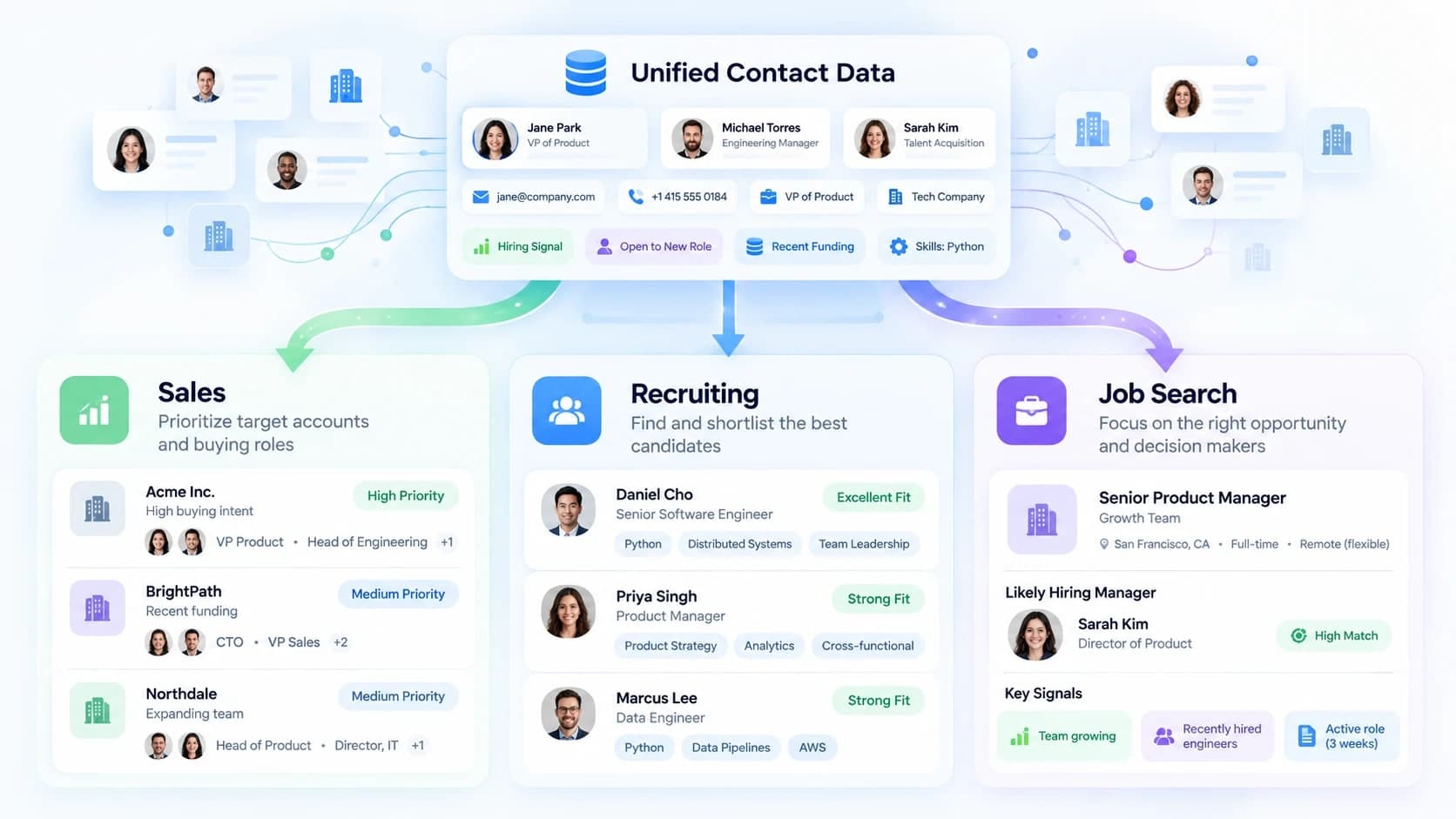
A work email, job title, and company profile may look like contact data. Their value changes with the person using them. A salesperson wants several relevant prospects, a recruiter wants qualified candidates, and a job seeker wants the person most likely to influence one vacancy. The data may overlap, but the research question does not.
This difference matters because contact discovery tools can return accurate information for the wrong person. Good research starts by defining the decision, role, or audience. Real-time enrichment comes later, when the user already has an identity and needs current professional details for a relevant message.
One Data Layer With Three Different Goals
The three workflows share a basic data layer: names, employers, roles, professional profiles, email addresses, and sometimes phone numbers. Each workflow applies a different filter before anyone should make contact. The comparison below shows why the starting point matters.
A broad database is useful because the team needs coverage across many organizations. SignalHire, for example, can provide a list of employees at a company as a starting point. The salesperson still has to narrow the result by department, seniority, responsibility, and likely involvement in the purchase. A large list is not a prospect list until those filters are applied.
| Context | Starting point | Successful result |
|---|---|---|
| Sales | An ideal customer profile, company type, territory, and buying role | A prioritized group of people who may have a business need and authority |
| Recruiting | A vacancy, candidate profile, skills, seniority, and location | A shortlist of people whose experience fits the work and hiring conditions |
| Job search | One specific vacancy, its likely reporting line, and the employer | The decision-maker most likely to manage the role or directly influence that hire |
Sales Starts With a Market and Narrows to People
Sales teams usually begin with an ideal customer profile. They may filter companies by sector, size, location, technology, funding stage, or another sign of likely demand. Only after choosing the right accounts do they search for people who own the budget, use the product, or influence the purchase.
Recruiting Starts With a Role and Looks for Evidence
Recruiters work in the opposite direction. The vacancy comes first, followed by the experience, skills, seniority, and location needed for the role. Titles help, but they are unreliable on their own. Two people called product manager may own very different products, markets, and levels of responsibility.
A recruiter should compare profile claims with the work described in the vacancy. Useful evidence may include recent projects, tools, industries, certifications, team size, or career progression. Contact data belongs near the end of the process. Finding a current email address does not make an unsuitable candidate more relevant.
Job Search Starts With One Vacancy
A job seeker has a narrower problem. The target is not every recruiter or manager at the company. It is the person most likely to review, manage, or influence the hiring decision for one opening. The job posting may reveal the department, manager level, team structure, location, and people the new hire will work with.
DearHiringManager is built around this vacancy-first workflow: it starts with the job posting, identifies the people most likely to influence that specific hire, and then finds the relevant professional contact details. General contact databases are broader tools and are typically most useful when the target person or role is already known. This is where sales-style volume can become a liability. Messaging several managers at the same company can look careless and may create duplicate conversations.
Where Contact Quality and Real-Time Enrichment Matter
All three workflows need current data after the person has been selected. People change employers, teams, titles, and email domains. A stale record can send a sales email to a former employee, direct a recruiter toward an outdated role, or cause a job seeker to contact someone who no longer manages the team.
Before sending an important message, users can compare the address with other email verification tools, check the employer's current domain, and confirm the person's recent role. Verification lowers the chance of a bounce, but it cannot confirm whether the recipient owns the decision.
A sensible contact check includes:
- Matching the employer and domain to the person's current public profile.
- Checking role dates, recent activity, and location for obvious conflicts.
- Comparing the address with a known company email pattern when one exists.
- Removing former employees, duplicate profiles, and addresses tied to old roles.
Use the Same Data in the Right Order
The data source may stay the same, but the research order should change with the task. A practical sequence is:
- Define the goal. Decide whether you need buyers, candidates, or the decision-maker behind one vacancy.
- Choose the correct starting point. Use an account profile for sales, a role profile for recruiting, or a job posting for job search.
- Identify plausible people. Filter by responsibility and context before looking for an email address.
- Confirm identity and current employment. Check for duplicate names, role changes, and stale profiles.
- Verify the contact and write one relevant message. Keep the note specific to the recipient and the reason for contacting them.
Doing this manually is possible, but for a single application it can require checking several profiles, titles, and company relationships before the right person becomes clear.
Know What Contact Tools Cannot Tell You
Contact discovery tools can find professional records, connect profiles, and refresh details. They cannot see every internal reporting line, explain office politics, confirm who has final authority, or know whether a manager wants direct outreach. Users must infer those facts from the vacancy, company structure, public activity, and the recipient's role.
Same Data, Different Job
Professional contact data is not tied to one use case. Sales, recruiting, and job search can use many of the same records, but each workflow begins with a different question. Sales asks which accounts and people may buy. Recruiting asks which people may fit a role. Job search asks who is most likely to influence one hiring decision.
Real-time enrichment works best after users identify the right person.